POS & Selling
Store AdminRun the counter like a parts desk — not a generic checkout.
Counter-speed selling with part-number search
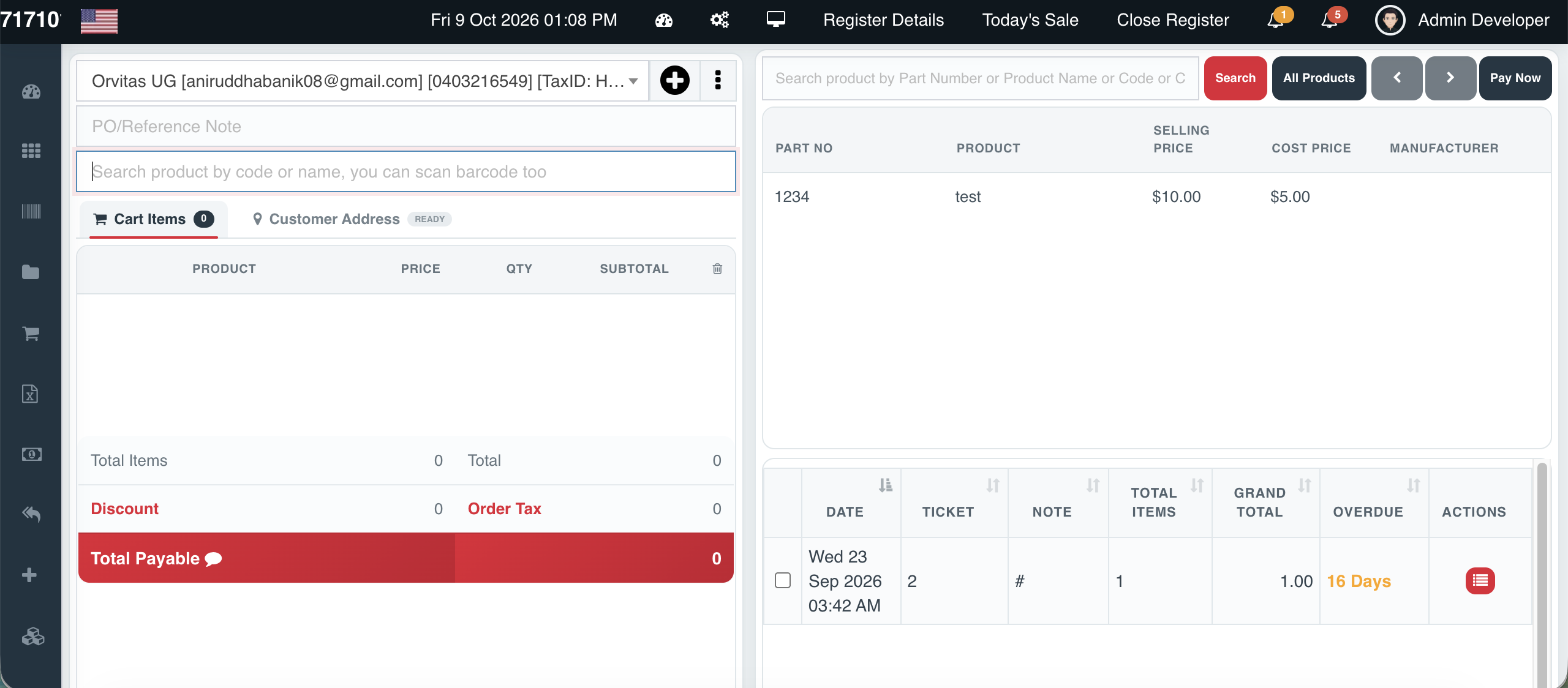
Overview
Cephre’s POS is built for automotive counters where staff think in part numbers, manufacturers, and cross references — not vague product names.
Add a customer mid-sale, park a ticket on Hold, cancel cleanly, and move to Payment with totals, discounts, and tax already calculated. Gift cards can be sold from the same register without leaving the sale flow.
The right-hand product panel keeps Part No, selling price, and manufacturer visible so counter staff confirm the correct SKU before it hits the cart.
What you get
- Search by Part No, product name, or code
- Hold / Cancel / Payment action bar
- On-the-fly customer create & attach
- Reference notes on every ticket
- Sell gift cards from the register
- Live payable total with tax & discount lines
Workflow
How it works
-
1
Open the register
Select store context and start a new sale.
-
2
Find the part
Search Part No or scan — confirm manufacturer and price.
-
3
Attach the account
Link a walk-in or B2B customer ledger account.
-
4
Close the sale
Apply discount/tax as configured, then Payment.
Capability map
Built into Cephre
- Multi-line cart with qty and subtotal
- Order tax and discount visibility before pay
- Gift card sell shortcut
- Register details & today’s sale links
- Close register workflow for end of day
Ready to put this on your counters?
Apply for a subscription package sized by Super Admin seats, store Admins, and outlets.